
Maintenance management software helps your team plan, assign and track every repair and inspection in one system. It replaces paper logs, chat messages and scattered spreadsheets with a clear record of what broke, who fixed it and when it needs service again.
Before you choose any CMMS, you will have questions about cost, data, training and rollout. This guide answers 30 of the most common questions maintenance managers ask before implementation, in a simple FAQ format. Use the sections to jump to the topic you need.
Maintenance Management Software Basics: Start Here
Q1. What is maintenance management software?
Maintenance management software is a digital tool that plans, assigns and records all maintenance work on your equipment and facilities. Technicians receive tasks on a phone or tablet, and managers see progress on one dashboard.
It also keeps a full history for every asset. That history helps you spot repeat failures and plan service before the next breakdown.
Q2. What does CMMS stand for, and is it the same thing?
CMMS stands for computerized maintenance management system. In everyday use, CMMS software and maintenance management software mean the same thing.
Some vendors use the term EAM for broader tools that also cover finance, depreciation and procurement. A CMMS stays focused on maintenance work. Choose the term your vendors and your team already use, because the features matter more than the label.
Q3. Who needs maintenance management software?
Any team that looks after machines, vehicles, buildings or utilities can benefit. Typical users include:
- Plant maintenance teams in manufacturing and automotive units
- Facility managers in offices, campuses and malls
- Engineering teams in hotels, hospitals and data centers
Even a team of five technicians gains when every work order lives in one place.
Q4. What problems does maintenance management software solve?
It tackles the daily headaches of a paper-based team:
- Missed service dates and forgotten inspections
- Lost or incomplete repair records
- Slow breakdown response because no one sees the queue
- Spare part stock-outs at the worst moment
- Last-minute scrambling before audits
In short, it turns firefighting into planned work.
Core Features of Maintenance Management Software
Q5. What features should maintenance management software have?
Look for these essentials:
- Work order creation, assignment and tracking
- Preventive maintenance schedules
- Asset register with maintenance history
- Spare parts and inventory control
- Mobile app with offline mode
- Dashboards and KPI reports
TechnoRishi’s Enterprise Asset Management System includes a maintenance module that schedules reminders, assigns responsibilities and tracks completion.
Q6. How does work order management work?
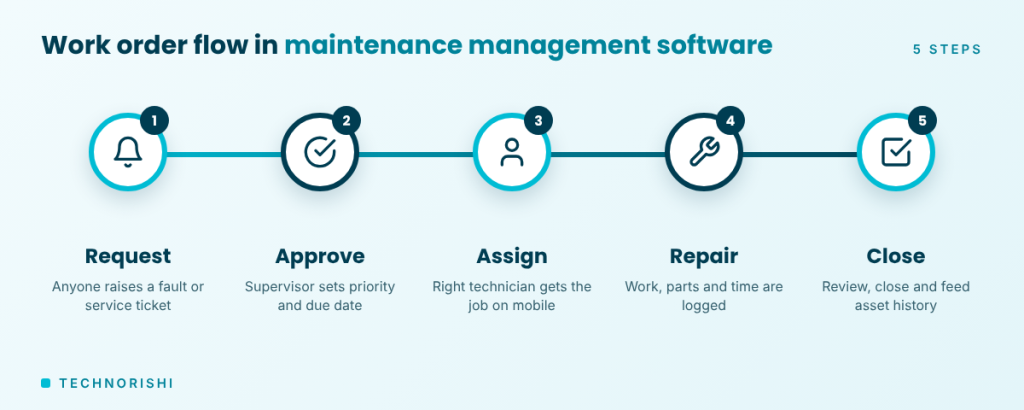
A work order moves through five simple steps:
- Someone raises a request for a fault or a planned task.
- A supervisor approves it and sets the priority.
- The system assigns it to a technician with a due date.
- The technician records the work, parts and time used.
- The manager reviews and closes the order.
Closed orders then feed your asset history and your KPIs.
Q7. Can technicians use maintenance management software on a phone, even offline?
Yes, if the software has a mobile app with offline mode. Technicians often work in basements, rooftops and remote yards where signal drops. The app stores their updates and syncs them when the network returns.
Ask a senior technician to test the app on the shop floor during your trial. Their feedback will tell you more than any brochure.
Q8. Do I need a helpdesk or service request module?
You need one if requests come from many departments. A helpdesk lets staff raise a ticket instead of phoning or messaging the maintenance team.
The system can route each ticket by problem type, priority, location or asset category. It can also escalate overdue tickets against your service levels, so urgent faults never sit unseen.
Preventive, Predictive and Reactive Maintenance
Q9. What is the difference between preventive, predictive and reactive maintenance?
The three approaches differ in timing:
- Reactive maintenance fixes equipment after it fails.
- Preventive maintenance services equipment on a calendar or usage schedule.
- Predictive maintenance acts when condition data shows a problem is developing.
Most plants use a mix of all three, and the software manages each one.
Q10. How much can preventive maintenance save?
The US Department of Energy’s maintenance best practices work, summarized by PNNL, estimates that preventive maintenance saves 12 to 18 percent over a purely reactive program.
Your own results depend on your equipment mix and your starting point. Preventive maintenance software helps most when you cannot rely on memory or paper to remember every task.
Q11. Can maintenance management software support predictive maintenance?
Yes, if it can store condition readings such as vibration, temperature or running hours. It should then raise a work order when a reading crosses a set limit.
Most teams build a solid preventive program first. Clean maintenance history is what makes predictive work possible later.
Q12. How does maintenance management software reduce unplanned downtime?
It replaces emergency repairs with planned work. Reminders trigger service on time, and every fault reaches the right technician quickly.
The Siemens True Cost of Downtime 2024 report found that the average large plant still loses about 27 hours a month to unplanned downtime. It also found that recovery now takes 81 minutes per incident, up from 49 five years earlier. Faster, better organized repairs are worth real money.
Costs, ROI and the Business Case for Maintenance Management Software
Q13. How much does maintenance management software cost?
Pricing depends on the number of users, the number of assets, the modules you choose and whether you deploy in the cloud or on-premise. Support plans also vary. Cloud plans usually charge per user per month, while on-premise licenses often carry a one-time fee plus yearly support.
Vendors rarely publish fixed prices. Request quotes using your real asset count and site list, so you can compare offers fairly.
Q14. Are there hidden costs I should plan for?
Yes. Budget for these items before you sign:
- Data cleaning and asset tagging
- Technician training time
- Integrations with ERP or HR tools
- Extra sites, users or modules added later
- Internal admin time to run the system
Q15. How do I calculate the ROI of maintenance management software?
Record your numbers before go-live, then compare them after your first full maintenance cycle. Track:
- Unplanned downtime hours
- Emergency repair spend and overtime
- Spare parts stock value
- Technician time per work order
Convert downtime hours into money using your hourly cost of lost production.
Q16. How do I build a business case for management?
Keep it short and numbers-led:
- Pick your three costliest repeat failures.
- Put a rupee value on every hour of downtime.
- Show your baseline and a cautious target.
- Propose a pilot with a clear review date.
Show the cost of one major breakdown next to the cost of the software. The comparison speaks for itself. Leaders also approve small pilots faster than company-wide rollouts.
Choosing a CMMS Vendor and Deployment Model
Q17. How do I choose the right maintenance management software?
Follow these five steps:
- Define your assets, sites, users and target KPIs.
- Shortlist three or four vendors.
- Run demos using your own equipment and scenarios.
- Pilot the leading option at one site.
- Check references and the quality of support.
Weight each step by your real priorities, and score every vendor on the same sheet.
Q18. Should I choose cloud or on-premise CMMS software?
Cloud software goes live faster, updates automatically and works across sites. On-premise software gives you tighter control over data and the network.
Involve your IT and security teams early, then confirm that the vendor offers the model you need. Also ask where the data is hosted and how often it is backed up.
Q19. What questions should I ask vendors during a demo?
Bring a short list:
- Can a technician close a work order offline?
- How do you import our asset data?
- Can PM tasks trigger by calendar and by meter reading?
- Which reports come as standard?
- What does support include, and how fast do you respond?
Ask the vendor to show each answer live, not on slides.
Q20. Should I choose a standalone CMMS or an all-in-one platform?
Standalone tools go deep on maintenance. All-in-one platforms connect maintenance with assets, visitors, gate passes and procurement.
If your teams already juggle several systems, a connected suite avoids double entry. TechnoRishi’s Facility Management System brings asset management, maintenance, gate pass and visitor workflows onto one platform. Ask which modules you can switch on later without signing a new contract.
Data Setup, Implementation and Rollout
Q21. What data do I need before I start?
Gather these basics before your project kicks off:
- Asset list with IDs, locations, make and model
- Criticality ranking for each asset
- Existing PM tasks and their frequencies
- Spare parts list with minimum stock levels
- Technician and vendor lists
Do not worry if some fields are blank. Mark them for later and fill them during your first audit walk-through.
Q22. How long does CMMS implementation take?
It depends on asset volume, the number of sites, data quality and integrations. A single-site pilot with clean data moves faster than a multi-plant rollout.
Plan in phases instead of one big date. Avoid calling the project live until your data is verified and technicians are using the mobile app. Ask your vendor for a timeline with named owners on both sides.
Q23. Should I load all my assets on day one?
No. Start with critical assets, meaning those whose failure stops production or creates a safety risk. Add the rest in waves. Review criticality with your production and safety teams, because they often rank assets differently from maintenance.
A smaller, clean register beats a large, messy one. Technicians lose trust quickly when they find wrong data.
Q24. What is the best rollout plan for maintenance management software?
A phased plan works best:
- Pilot one site or production line.
- Load critical assets and their PM tasks.
- Train technicians and supervisors.
- Run the new system alongside paper for a short period.
- Review KPIs and fix problems.
- Expand site by site.
Keep the pilot team small, so feedback reaches you fast.
Training, Adoption and Technician Buy-In
Q25. How do I get technicians to use maintenance management software?
Involve them early. Ask senior technicians to help design work order forms and checklists. Keep forms short, and use pick-lists instead of free text.
Show quick wins, such as finding an equipment manual in seconds. Then track on-time data entry as a KPI, and praise the teams that do it well.
Hold a short kickoff on each shift so nobody feels left out. Fix the first complaints within days. A quick response proves that the tool exists to help technicians, not to watch them.
Q26. How much training do teams need?
Plan role-based training. Technicians learn mobile work orders and closing jobs. Supervisors learn scheduling and approvals. Managers learn dashboards and reports.
Short, hands-on sessions on real equipment work better than long lectures. Name a few in-house champions who can answer daily questions, and keep one-page quick guides at each site. Repeat a refresher session after the first month, because real questions only appear once people use the system daily.
Q27. Which maintenance KPIs should I track after go-live?
Start with these six, and review them monthly:
- PM compliance: the share of planned tasks done on time
- MTBF: mean time between failures
- MTTR: mean time to repair
- Open work order backlog
- Planned versus reactive work ratio
- Maintenance cost per asset
Share the results on a simple dashboard so teams see their progress. For example, a rising PM compliance rate shows that planned work is replacing emergency calls.
Integrations, Security and Scaling Up
Q28. Can maintenance management software integrate with ERP, HRMS and procurement?
It should. For example, the system can raise a purchase request when spare part stock falls below its minimum. It can also pull technician rosters from your HR system.
TechnoRishi’s EAM integrates with SAP, Oracle, Microsoft Dynamics and Active Directory single sign-on. Pairing it with eProcurement software speeds up the buying of spares and keeps purchase records tidy. Good integrations remove double entry and delays. Check whether the vendor offers an API or ready connectors before you commit.
Q29. How do I manage contractors who service our equipment?
Record each external job as a work order with the vendor name, scope, time and cost. That way, contractor work sits in the same history as your own team’s work.
Also control site access. TechnoRishi’s Gate Pass Management System includes work pass permits that help you check contractor qualifications, insurance and certifications before they enter your premises. At year end, review vendor performance using the work order history.
Q30. Can maintenance management software grow with my business?
Yes, if you choose well. Pick a system that adds users, assets, sites and modules without moving to a new platform.
Check for role-based access and field-level permissions, which TechnoRishi’s EAM supports. Also confirm that you can export your data at any time, so you are never locked in.
Ask how the vendor handles multi-site rollouts, new user groups and growing data volumes. Reference calls with similar-sized customers answer these questions faster than a brochure.
Final Thoughts: Start Your Maintenance Management Software Journey
The right maintenance management software turns firefighting into planned, measurable work. Start with clean data on your critical assets, involve your technicians early and pilot at one site before you scale.
Want to see how it works on your own equipment?
Request a demo of TechnoRishi’s maintenance management software today.