
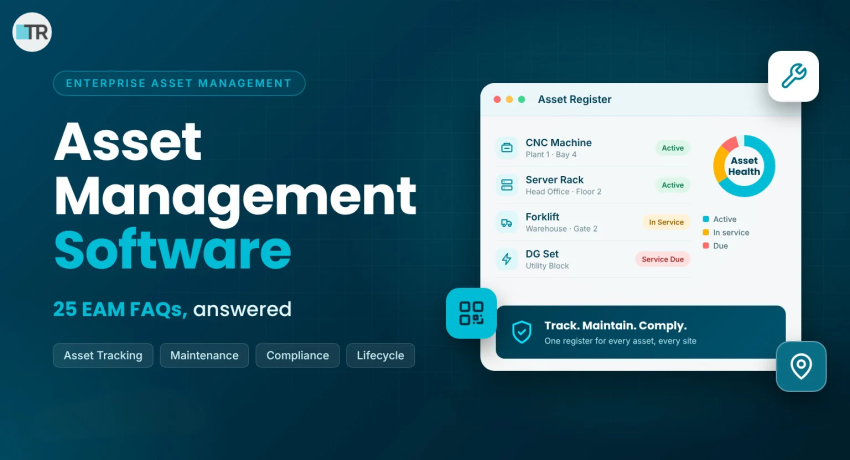
Asset management software gives your business one live record of every machine, vehicle, device and piece of equipment it owns. It shows where each asset sits, what condition it is in and when it needs service.
For Indian enterprises that run several plants, offices or warehouses, that visibility means fewer breakdowns, calmer audits and less wasted spend.
This guide answers 25 of the most common questions about enterprise asset management (EAM) software. Each answer is short and practical, so buyers, plant heads, finance teams and facility managers can find what they need fast.
Asset Management Software Basics: What You Need to Know
1. What is asset management software?
Asset management software is a digital system that records, tracks and maintains every asset a company owns. It replaces scattered Excel sheets and paper registers with one searchable database.
Each asset gets a unique ID, an owner, a location, a purchase value and a service history. Teams can then follow the full asset lifecycle, from purchase to disposal, in one place.
2. What is the difference between EAM, CMMS and IT asset management?
The three overlaps, but their scope differs:
- CMMS focuses on maintenance schedules and work orders.
- IT asset management (ITAM) covers laptops, servers and software licenses.
- EAM covers every asset type across its entire lifecycle, including finance, compliance and procurement.
Many growing companies start with a narrow tool. They later move to enterprise asset management to avoid running three disconnected systems.
3. What counts as an asset?
An asset is anything that holds value for your organization. Common examples include:
- Production machines, tools and spares
- Vehicles, forklifts and DG sets
- IT equipment such as laptops, servers and network devices
- Furniture, fixtures and building systems
The ISO 55000 standard states that asset management applies to all types of assets and to organizations of every type and size.
4. How does asset management software work?
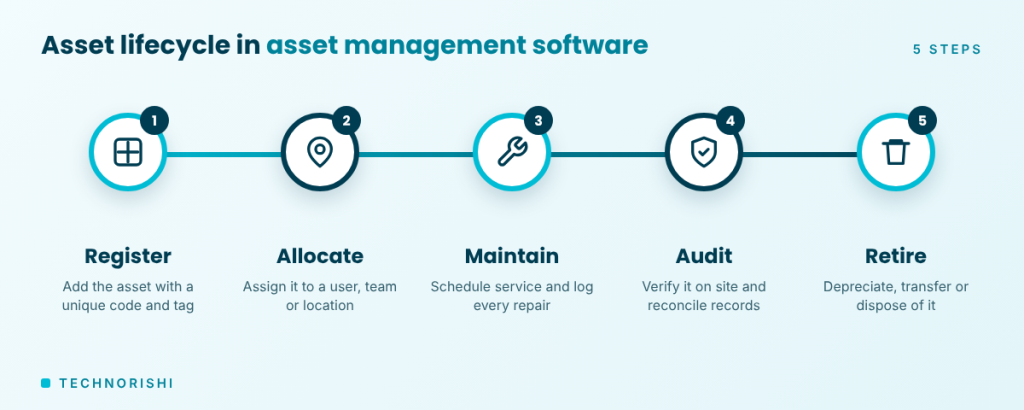
The software follows each asset through five steps:
- Register the asset with a unique code and tag.
- Allocate it to a user, department or location.
- Maintain it with scheduled service and repair logs.
- Audit it by verifying it on site and reconciling records.
- Retire it through depreciation, transfer or disposal.
Every step leaves an audit trail, so your reports stay accurate and easy to defend.
Key Features of Asset Management Software
5. What are the core features of asset management software?
Look for these essentials:
- Asset register with unique IDs and categories
- Check-in, check-out and allocation
- Barcode, QR code and RFID tagging
- Preventive maintenance scheduling
- Fixed asset depreciation
- Audit and reconciliation tools
- Role-based access and reports
TechnoRishi’s Enterprise Asset Management System covers these features and adds a helpdesk and IT asset discovery.
6. How does asset tracking work with barcodes, QR codes and RFID?
Each asset carries a tag that holds its unique code. A staff member scans the tag with a smartphone or handheld device, and the record opens instantly. Any update syncs to the central register.
Barcodes and QR codes cost little and suit most assets. RFID suits large inventories and quick audits, because it reads tags without a direct line of sight.
7. Can EAM software handle preventive and predictive maintenance?
Yes. Preventive maintenance follows a calendar or usage schedule. For example, the software can remind your team to service a compressor every 500 running hours and assign the task automatically.
Predictive maintenance goes one step further. It uses condition data, such as vibration or temperature, to flag a problem before the asset fails. Most companies start with preventive schedules and add predictive checks later.
8. Does asset tracking software work on mobile and offline?
Good systems do. Technicians often work in basements, yards or remote plants with weak signal. A mobile app lets them scan assets, view tickets and log maintenance offline, then sync with the server when the network returns.
Ask every vendor to demo offline mode on a real device before you buy.
Benefits, ROI and Cost of Asset Management Software
9. What are the main benefits of enterprise asset management?
The biggest gains come from control and visibility:
- Fewer breakdowns, thanks to scheduled service
- Longer asset life and better use of what you already own
- Faster, cleaner audits
- No ghost assets inflating your books
- Lower purchase costs, because you can spot idle assets before buying new ones
10. How does asset management software reduce downtime?
It replaces reactive repair with planned service. Alerts prompt maintenance before parts fail, and work orders reach the right technician quickly.
Downtime is expensive. The Siemens True Cost of Downtime 2024 report estimates that unplanned downtime costs the world’s 500 biggest companies about $1.4 trillion a year, or 11% of their revenues.
Smaller manufacturers feel the pain too. Siemens notes that late deliveries can cost them their status as a trusted supplier.
11. How much does asset management software cost?
Pricing depends on four factors: the number of assets, the number of users, the modules you choose and the deployment model (cloud or on-premise).
Tagging, training and data migration add one-time costs. Vendors rarely publish fixed prices, so request a quote based on your asset count and sites. Also ask what the support plan includes.
12. How do you measure the ROI of EAM software?
Pick a few clear numbers and record them before go-live:
- Unplanned downtime hours per month
- Maintenance cost per asset
- Asset utilization rate
- Time spent on audit preparation
- Missing or ghost assets found
Measure the same numbers again after your first full maintenance cycle. The difference shows your return.
Choosing the Right Asset Management Software for Your Business
13. How do I choose the best asset management software?
Follow these six steps:
- List your asset types, sites and users.
- Rank must-have features, such as tracking, maintenance, depreciation and compliance.
- Check integrations with your ERP, HRMS and procurement tools.
- Test ease of use with your own technicians.
- Review support, training and data security.
- Run a pilot at one site before you scale.
14. Should I choose cloud or on-premise EAM software?
Cloud suits multi-site companies. It needs no servers, updates automatically and works from any location. On-premise suits organizations with strict data-residency or network rules.
Involve your IT and security teams early, especially in regulated sectors such as banking and financial services (BFSI). Then confirm that your vendor offers the model you need.
15. Can asset management software integrate with ERP, HRMS and procurement systems?
It should, because integration stops double entry. For example, an approved purchase can create a new asset record, and an employee exit can trigger an asset return.
TechnoRishi’s EAM integrates with SAP, Oracle, Microsoft Dynamics and Active Directory single sign-on. Pairing it with a procurement tool, such as TechnoRishi’s eProcurement software, keeps purchase and asset data aligned.
16. Is asset management software suitable for small and mid-sized businesses?
Yes. Breakdowns and lost assets hurt smaller firms more, because they have less buffer. Siemens reports that downtime can cost smaller manufacturers as much as $150,000 an hour at the top end.
Start with core modules, such as tracking and maintenance, and add more as you grow. Choose a vendor that lets you add modules and users without moving to a new platform.
Implementation, Data Migration and Security
17. How long does it take to implement asset management software?
The timeline depends on asset volume, the number of sites, data quality and integrations. A single-site pilot moves faster than a multi-plant rollout.
Phase the project. Configure the system, tag and verify assets, train users and then go live site by site. Ask your vendor for a plan with clear milestones instead of one vague end date, and keep a named owner on your side for each phase.
Expect tagging and physical verification to take the most effort, because teams must walk every site and match each asset to a record.
18. How do I move existing asset data from Excel into EAM software?
Treat migration as a clean-up project, not a copy-and-paste job:
- Gather every register and remove duplicates.
- Standardize names, categories and locations.
- Fill missing fields, such as purchase date, cost and owner.
- Import in batches and review the errors.
- Physically verify and tag each asset.
Clean data matters more than speed. A faulty register only moves its errors into the new system.
19. How secure is asset data in asset management software?
Look for role-based access, field-level permissions and audit logs. These controls decide who can add, edit, transfer or discard assets, and who can see sensitive values such as cost.
Also check backups, encryption and single sign-on. TechnoRishi’s EAM supports user roles and field-level permissions, so sensitive asset details stay hidden from people who do not need them. Ask each vendor to show these controls live during the demo. Finally, confirm where your data is hosted and who can access the backups.
Compliance, Depreciation and Audits in India
20. How does asset management software handle fixed asset depreciation?
You set the depreciation rules once, and the system calculates charges for all fixed assets. Indian companies follow Schedule II of the Companies Act, 2013, which sets useful lives for computing depreciation.
The software applies those lives consistently and produces depreciation reports on demand. Tax depreciation follows separate income tax rules, so confirm the final treatment with your finance team or auditor.
For example, Schedule II lists a 15-year useful life for general plant and machinery and 3 years for end-user devices such as laptops. The system applies the right life to each asset class and flags an asset once it is fully depreciated.
21. Can EAM software help with audits and STPI or SEZ compliance?
Yes. Units registered under STPI or SEZ schemes can face audits by STPI, customs or excise authorities, and they must produce asset annexures and reports on request.
Software with a dedicated module generates these reports from live data. TechnoRishi’s EAM includes an STP/SEZ module that auto-generates compliance annexures and fixed asset reports. Regular barcode or RFID verification keeps your register audit-ready all year.
22. What are ghost assets, and how can software find them?
Ghost assets are items that sit on your books but cannot be found on the floor. They may be lost, stolen, scrapped without a record update or entered by mistake.
Scan-based audits expose them. When an asset leaves the premises, link the movement to a gate pass so it cannot vanish unnoticed. TechnoRishi’s Gate Pass Management System records materials and assets that move in and out of your site. Run a full verification at least once a year, and again after every major relocation.
Industry Use Cases and the Future of Asset Management Software
23. Which industries benefit most from enterprise asset management?
Any organization with many assets across many places benefits. Typical examples include:
- Manufacturing: machines, tools, spares and maintenance schedules
- BFSI: branch equipment, IT devices and furniture across locations
- Automotive: plant equipment, tooling and test rigs
- Hospitality: kitchen equipment, HVAC and room assets
- IT services and offices: laptops, devices and seating across sites
- Healthcare and education: medical devices, lab equipment and campus assets
24. How does asset management software work with facility management?
Assets live inside facilities. Facility management software tracks spaces, visitors, bookings and work orders, while asset software tracks the equipment inside those spaces. Together, they give you one view of your buildings and everything in them.
TechnoRishi’s Facility Management System brings asset management, maintenance, gate pass and visitor workflows onto one platform, so teams stop switching between tools.
For example, when a chiller raises a fault, the helpdesk ticket can link to its asset record. The technician then sees the repair history before arriving on site.
25 .What is the future of asset management software?
Three trends stand out. First, IoT sensors feed live condition data straight into the asset register. Second, AI helps predict failures and plan maintenance. Third, standards keep evolving, and ISO published the second edition of ISO 55000 in July 2024.
Companies that build clean asset data today will adopt these tools faster tomorrow. Good data is the foundation for every smart feature that follows. Start small by tagging your most critical assets first, then build from there.
Final Thoughts: Choose Asset Management Software with Confidence
The right asset management software gives you one trusted register, fewer surprises and audit-ready records. Start by listing your assets, cleaning your data and shortlisting vendors that fit your sites, integrations and compliance needs.
Ready to see Asset Management Software it in action?