
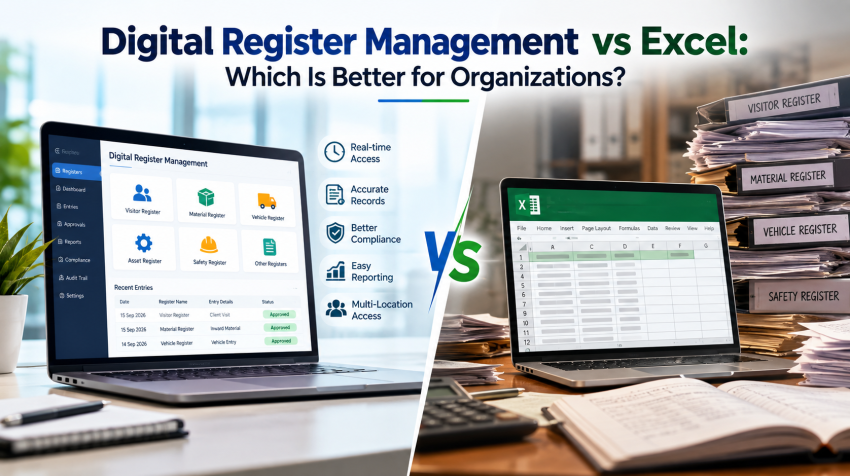
Every organization keeps registers. Visitor logs, gate entries, contractor attendance and asset records all need a reliable home. Many teams start with Excel because it is familiar and quick to set up. But as records grow, they begin to ask whether Digital Register Management Software is the smarter choice.
This guide compares both options on accuracy, security, speed and cost. You will see where Excel still works, where it falls short, and how to choose the right fit for your organization.
What Is Digital Register Management?
Digital Register Management means recording, storing and tracking entries in dedicated software instead of paper books or spreadsheets. Staff capture each entry through a form, tablet, mobile app or kiosk, and the system time-stamps it automatically.Unlike a spreadsheet, the software follows set workflows. It validates data as users type, alerts the right person and builds reports on demand. For example, a Visitor Management System can capture a photo, print a badge and notify the host within seconds.
Key Benefits of Digital Register Management
Moving to paperless record keeping changes how teams work every day. The main gains are:
- Fewer errors: Mandatory fields and dropdowns replace free typing.
- Real-time visibility: Security, HR and managers see the same live data.
- Stronger security: Role-based access controls who can view or edit records.
- Faster search: Find any entry in seconds by name, date or vehicle number.
- Easy reporting: Generate daily, weekly or audit reports with one click.
Where Excel Works and Where It Falls Short
Where Excel works well
- Most staff already know how to use it
- Upfront cost is low
- Formulas and charts are easy to customize
Where Excel falls short
- Manual typing invites errors and missed fields
- Anyone with file access can edit or delete past records
- Multiple copies create confusion, such as “Register_final_v3.xlsx”
- It cannot send alerts, route approvals or capture photos on its own
- Large files slow down, even though a worksheet allows up to 1,048,576 rows
Consider a plant security desk that logs 300 visitors and vehicles a day in a shared sheet. That adds up to roughly 9,000 rows a month. Names get misspelled, exit times go missing and duplicates creep in. When an incident occurs, finding who was on site means scrolling and guessing.
Digital Register Management vs Excel: Key Differences
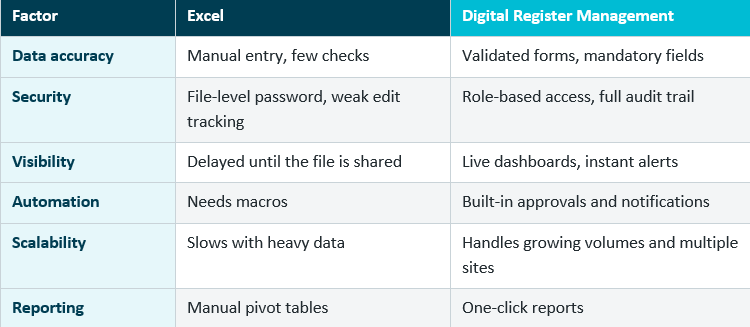
Here is how the two approaches compare on the factors that matter most.
Accuracy and Security
Digital forms use mandatory fields and dropdowns, which cut typing mistakes. An audit trail logs every edit. Excel offers file-level passwords, but it rarely shows who changed a cell or when.
Speed and Automation
Software sends instant alerts, completes approvals digitally and produces reports in one click. Excel needs manual pivot tables or macros for the same result. A Gate Pass Management System also replaces paper slips and phone calls at the gate.
Compliance and Audit Readiness
The Digital Personal Data Protection Act, 2023 expects organizations to protect personal data, including visitor names and phone numbers, with reasonable security safeguards. Access controls and audit logs make it easier to show you follow that expectation. A spreadsheet emailed between departments makes it much harder.
How to Choose the Right Option
Start with your daily volume, your number of locations and the sensitivity of the data you record. Then work through this checklist:
- Volume: Do you log more than a few dozen entries a day?
- Risk: Would a missing or altered record cause a security or compliance problem?
- Teams: Do several people or locations update the same register?
- Speed: Do you need real-time alerts or instant reports?
- Growth: Will your record volume rise in the next year?
If you answer yes to two or more, it is time to consider Digital Register Management. Contractor-heavy sites can link registers with a Contractor Labour Management System, and larger facilities can connect them to a Facility Management System for one joined-up view.
If Excel still fits, keep it, but set ground rules. Lock the header row, restrict editing rights and back up the file daily.
Frequently Asked Questions
Is Digital Register Management better than Excel?
For most growing organizations, yes. It offers stronger accuracy, security and reporting. Excel remains fine for small, low-risk records.
Can I import my existing Excel data?
Many register systems support bulk imports from Excel or CSV files, so you can keep your history. Confirm this with your vendor before you buy.
Does digital register software work across multiple locations?
Yes. Cloud-based systems let several sites update one central register in real time.
Is Digital Register Management difficult for staff to learn?
Not usually. Forms are simple, and staff enter data on a tablet or phone instead of a sheet. A short training session normally covers it.
Conclusion
Excel is a good starting point, but it was built for calculations, not for secure, real-time record keeping. Digital Register Management System gives you accurate data, clear audit trails and faster reporting as your organization grows.
Ready to leave manual sheets behind?
Connect us to see how our digital solutions can simplify your manual registers