
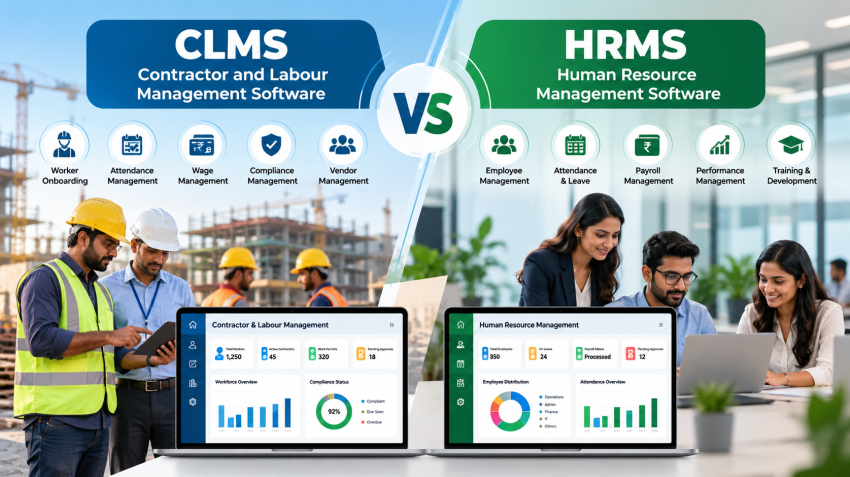
Choosing between CLMS vs HRMS software is a common puzzle for HR, admin, and safety teams across India. In practice, they solve very different problems.
A Human Resource Management System (HRMS) manages your own employees. A Contractor Labour Management System (CLMS) manages the third-party workers who enter your premises through contractors. Mixing the two up leads to compliance gaps, messy gate entry, and payroll errors.
This Blog explains what each system does, how they differ, and when you need one, the other, or both
What is a Contractor Labour Management System (CLMS)?
A contractor labour management system helps a principal employer control the full lifecycle of contract workers. The principal employer is the company that engages contractors to supply labour. The software covers contractor onboarding, worker verification, site access, attendance, safety training, and statutory compliance.
Contract workers are not on your payroll. Your contractor employs them, pays them, and stays responsible for their wages. Yet Indian labour law still holds you, as the principal employer, answerable for key obligations. A CLMS gives you the records to prove you meet them.
Core features of a CLMS
- • Contractor database: licences, agreements, insurance, and work orders in one place.
- • Worker onboarding: ID checks, background verification, and document storage.
- • Digital work pass: gate access that depends on valid documents and training.
- • Attendance tracking: biometric, RFID, or QR-based check-in and check-out.
- • Safety and skill tracking: certificate expiry alerts and PPE issue records.
- • Compliance checks: proof of wage, PF, and ESIC payments before you clear contractor bills.
- • Blacklisting: instant alerts when a barred worker or contractor tries to return.
The TechnoRishi CLMS, for example, brings these modules together with a digital worker work pass, attendance, PPE, and blacklisting workflows.
What Is Human Resource Management System (HRMS) Software?
HRMS software digitises HR work for your permanent and direct-hire employees. It follows an employee from hiring to retirement. HR teams use it to keep one clean record for every person and to automate repetitive tasks.
The focus is employee experience and HR efficiency. Its daily users are HR managers, payroll teams, and the employees themselves.
Core features of HRMS software
- Recruitment and onboarding: job openings, offer letters, and joining formalities.
- Employee master data: one central profile for every employee.
- Attendance and leave: shift rules, leave balances, and approvals.
- Payroll: salary processing, statutory deductions, and payslips.
- Performance and training: appraisal cycles, goals, and learning records.
- Employee self-service: staff view payslips and apply for leave on their own.
- Exit management: resignation, clearance, and final settlement.
Why companies adopt an HRMS
Manual HR is slow and error-prone. An HRMS cuts paperwork, keeps statutory data accurate, and gives leaders reports on headcount, attrition, and leave. Employees benefit too, because they can open payslips and records without chasing HR.
Modern HRMS platforms also support biometric attendance and mobile apps, which helps teams spread across locations. They usually connect with accounting and ERP tools, so payroll data flows to finance without re-entry. Smaller companies often start with core HR and payroll, then add modules as they grow.
Note what an HRMS does not do. It is built around the employer-employee relationship, so it does not track contractors, contractor licences, or gate entry. That scope is the first point in the CLMS vs HRMS software comparison.
HRMS software digitises HR work for your permanent and direct-hire employees. It follows an employee from hiring to retirement. HR teams use it to keep one clean record for every person and to automate repetitive tasks.
The focus is employee experience and HR efficiency. Its daily users are HR managers, payroll teams, and the employees themselves.
Core features of HRMS software
- Recruitment and onboarding: job openings, offer letters, and joining formalities.
- Employee master data: one central profile for every employee.
- Attendance and leave: shift rules, leave balances, and approvals.
- Payroll: salary processing, statutory deductions, and payslips.
- Performance and training: appraisal cycles, goals, and learning records.
- Employee self-service: staff view payslips and apply for leave on their own.
- Exit management: resignation, clearance, and final settlement.
Why companies adopt an HRMS
Manual HR is slow and error-prone. An HRMS cuts paperwork, keeps statutory data accurate, and gives leaders reports on headcount, attrition, and leave. Employees benefit too, because they can open payslips and records without chasing HR.
Modern HRMS platforms also support biometric attendance and mobile apps, which helps teams spread across locations. They usually connect with accounting and ERP tools, so payroll data flows to finance without re-entry. Smaller companies often start with core HR and payroll, then add modules as they grow.
Note what an HRMS does not do. It is built around the employer-employee relationship, so it does not track contractors, contractor licences, or gate entry. That scope is the first point in the CLMS vs HRMS software comparison.
CLMS vs HRMS Software: Key Differences
The simplest way to separate CLMS vs HRMS software is to ask one question: who is the worker? If the person is on your payroll, the HRMS handles them. If the person works for a contractor, the CLMS handles them.
HRMS looks inward at your own workforce. CLMS looks outward at your extended workforce.
The table below shows how the two compare.
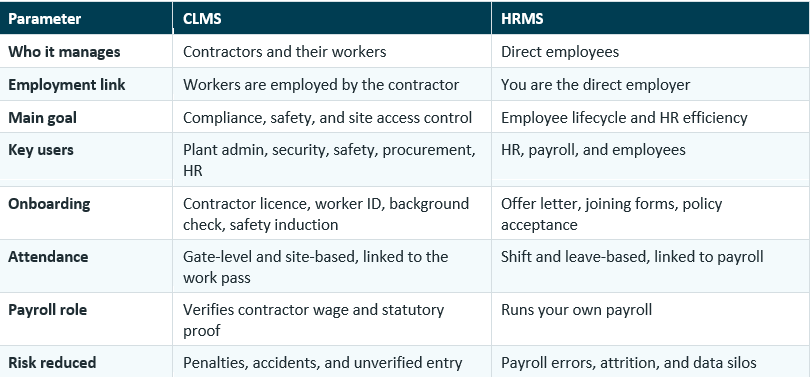
Imagine a Bengaluru plant with 300 direct employees and 700 contract workers supplied by 25 contractors. The HRMS covers the 300 employees. The other 700 people need contractor-wise records, work passes, and compliance proof, and that is exactly what a CLMS provides. Moreover, both these system can be integrated as per the desired output as per your Organization.
Why HRMS Alone Cannot Manage Contract Workers
Some companies add contract workers into their HRMS as if they were employees. The shortcut feels efficient at first, especially for small teams, but it creates four problems:
- Blurred legal status: contract workers are not your employees, and mixing records hides that line.
- No contractor-level control: an HRMS has no concept of contractor licences, work orders, or contractor-wise compliance.
- Weak gate integration: most HRMS tools do not issue work passes or verify safety certificates at entry.
- Slow audits: inspectors ask for contractor-wise records, and sorting them from an HR database takes days.
Think about an inspection visit. The inspector asks for the list of contractors, the number of workers each one supplied, and their wage proof for the last quarter. In a CLMS, that is one report. In an HRMS, someone builds it by hand. In the CLMS vs HRMS software decision, audit readiness often tips the balance.
Regulation adds pressure. India brought its four Labour Codes into effect on 21 November 2025. The Occupational Safety, Health and Working Conditions (OSH) Code absorbed the Contract Labour (Regulation and Abolition) Act, 1970, among other laws. The Ministry of Labour & Employment publishes the codes, and rules under them continue to be notified by the Centre and states, so confirm current requirements for your state.
Contract workers also bring provident fund and insurance duties. You can verify these on the official EPFO and ESIC portals, and a CLMS keeps that proof ready for every contractor invoice.
How a CLMS and an HRMS work together
These systems are partners, not rivals. When integrated, they remove double data entry and give leaders one view of everyone on site.
- Shared master data: Departments, cost centres, and locations stay consistent.
- Unified headcount: You know how many employees and contract workers are on site during an emergency.
- Cross-checked payments: Contractor wage proof lines up with your finance and payroll records.
- Single access layer: A gate pass system can link employees, visitors, and contractors.
When you evaluate CLMS vs HRMS software vendors, ask whether the platforms connect through APIs. TechnoRishi offers CLMS, HRMS, Gate Pass, and Visitor Management modules, so you can connect them under one vendor. For a deeper look at contractor automation, read our guide on contractor and labour management software.
Frequently Asked Questions
What is the difference between CLMS vs HRMS software?
CLMS software manages contractors and their workers, with a focus on compliance, safety, and site access. HRMS software manages your direct employees across the hire-to-retire cycle. In short, CLMS vs HRMS software differs by the type of workforce each one controls.
Can HRMS software manage contract workers?
It can store basic details, but it cannot handle contractor licences, work passes, or contractor-wise compliance. A dedicated CLMS is better suited to those tasks. For example, an HRMS cannot stop a worker from entering the site when a safety certificate expires.
Is a CLMS only for manufacturing companies?
No. Any organisation that uses contract labour can benefit, including construction, hospitality, healthcare, retail, and facility management firms. The CLMS vs HRMS software choice depends on your workforce mix, not your sector.
Does a CLMS handle contractor payroll?
Contractors pay their own workers. A CLMS checks wage and statutory proof, and some platforms also offer a contractor payroll module to organise wage data.
Can I buy CLMS and HRMS from the same vendor?
Yes. Using one vendor simplifies integration, training, and support. Just confirm that each module is strong on its own.
Which is more important for compliance, CLMS or HRMS?
Both matter, but they cover different risks. HRMS covers employee compliance. CLMS covers contract labour compliance, which is harder to track because workers move between sites and contractors change often. When you weigh CLMS vs HRMS software for compliance, start with the group that carries more risk.
Conclusion: Pick the Right Tool for Each Workforce
The debate over CLMS vs HRMS software ends once you separate your workforce into two groups. Use an HRMS for the people you employ. Use a CLMS for the people your contractors employ. Most growing enterprises end up using both, connected through shared data. Whether you pick one or both, knowing the CLMS vs HRMS software difference helps you buy the right tool once.
Looking for a better way to manage contractors and employees?
Book a free demo of the TechnoRishi Contractor & Labour Management System and HRMS to see CLMS vs HRMS software working together in your operations.